
Step Three
"Carefully managed settings help build the foundation for your success"
Maker Dashboard- Settings
Maker Dashboard
- SETTINGS
- Storefront
- Banner
- Profile Picture
- Store Names & Categories
- Options
- Biography
- Payment
- Shipping
- Social Profiles
- Store SEO
- SEO Title
- META Description
- META Keywords
- Facebook Title
- Facebook Description
- Facebook Image
- X Title
- X Description
- X Image
- Storefront

Banner
Your First Impression - Make it Great!
A banner is different than your logo. This image gives customers a quick sense of what your Storefront offers and helps your products stand out from others. This is an image at the top of the page – the first thing that your shoppers will see. Choosing a clear, high-quality image that reflects your products or brand will help attract attention and encourage customers to explore your store.
- Size: 625px × 300px (horizontal works best).
- Quality: Use a clear, high-resolution image — no blurry or dark photos.
- Style: Match your brand’s colors, tone, and logo.
- Keep it simple: Avoid clutter or too much text.
- Stay fresh: Update it seasonally or when you launch new products.
- A great banner tells your story before shoppers even scroll.

Profile Picture
Your profile photo helps shoppers connect with you
— make it friendly and professional!
- Size: 300px x 300px – minimum size 150px x 150 px
- Use a clear, high-quality image (not blurry or dark).
- Show your face or your craft — whichever represents your shop best.
- Keep the background simple so you stand out.
- Smile or choose a warm, approachable image — it builds connection.
- A great photo helps shoppers see the real maker behind the craft.


Store Name & Categories
The Storefront Name should auto populate, if it does not it is the same name you entered when you registered your account.
Your Storefront Name should look like this:
https://MyLocalCrafters.com/
store/name of your store
Store Categories help organize your storefront and make it easier for customers to understand what types of products you offer. Selecting the right category helps your store appear in relevant searches and allows customers to quickly find vendors that match their interests.
A list of Categories are available in the drop-down.
Choose the category that best represents the main products you sell in your store. Uncategoried is a default setting.


Options
These options allow you to choose what
customers will see on your Storefront
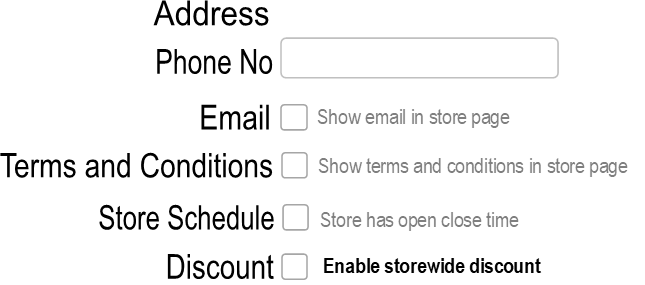
ADDRESS:
It is recommended that you include at least your city and state so Shoppers can easily search for you in their area. The only required information is the country. At this time we only conduct business within the US.
EMAIL:
Adding your email address allows customers to contact you directly and is recommended for your Storefront. We also styrongly suggest an email with your Storefront name included. This will help them remember you and your products.
TERMS & CONDITIONS:
These help customers understand how you conduct your business, including policies related to purchases, returns, or other important information.
STORE SCHEDULE:
This option is useful if you have a physical store location, allowing you to list your hours of operation.
DISCOUNT
This is a helpful tool if you want to offer storewide discounts, such as at the end of a season or when clearing out inventory.

Biography
Ideas for Your Storefront Biography
INTRODUCE YOURSELF
- Your name or how you’d like to be known.
- A little about where you’re from or where your crafts are made.
- How long you’ve been crafting or what inspired you to start.
SHARE YOUR CRAFT STORY
- What type of crafts you make (e.g., woodworking, candle-making,).
- How you discovered your passion for crafting.
- What inspires your designs — nature, family, tradition, etc.
- Any special techniques or materials you use.
TALK ABOUT YOUR PRODUCTS
- What makes your creations unique or handmade with care.
- Whether you take custom orders or personalize items.
- How your products are used — gifts, home décor, seasonal, etc.
ADD A PERSONAL TOUCH
- A fun fact about you (favorite craft fair, coffee preference, etc).
- A short message to your customers — gratitude, encouragement, or joy for supporting handmade.
- Mention your shop’s mission or what crafting means to you.
OPTIONAL ADDITIONS
- Awards, craft fair participation, or media features.
- Links to social media pages (if allowed).
- A favorite quote about creativity or handmade work.
Make sure to Update Settings to Save your Information
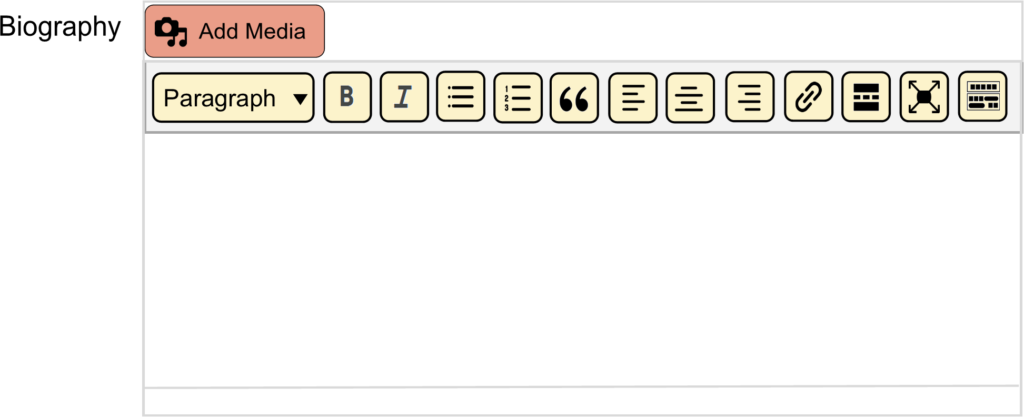
Use the formatting tools to style and
organize your biography. These tools allow
you to adjust text, add headings, and
format your content so it is clear,
easy to read, and visually appealing
for customers visiting your storefront.
- Payment
This section allows you to connect and manage how you receive payments for orders placed in your Storefront. Here you can link your Stripe account, PayPal account, or bank information so that earnings from your sales can be transferred to you. Setting up your payment methods ensures that once a customer completes a purchase, your payment can be processed and sent to your account.

- Shipping
The Shipping section allows you to set up how your products will be delivered to customers. Here you can define your shipping rates, delivery areas, and shipping methods to ensure customers see accurate shipping costs at checkout.
Properly setting up your shipping options helps provide clear expectations for delivery and ensures a smooth ordering experience for your customers.

When you click on the “Add Shipping Policies” a screen will appear to give you the options for
- Processing Time
- Shipping Policy
- Refund Policy
- Social Profiles
This section allows you to add links to your social media accounts so customers can connect with you beyond your Storefront. Sharing your profiles helps promote your brand, showcase your products, and build relationships with customers by allowing them to follow your work and stay updated on new items or announcements.
- X
- Youtube
- TikTok
- Flickr
- Threads
- Store SEO
SEO Title
The SEO Title is the title that appears in search engine results. It helps search engines and users understand what the page is about and can improve the page’s visibility when people search for related topics.
Tip: Keep it short and descriptive (about 50–60 characters).
Title Examples
- Custom Handmade Jewelry
- Handcrafted Planters & Outdoor Accents
- Artisan Crafts for Every Occasion
- Handcrafted Items for Home & Garden
- Unique Artisan Designs, Seasonal Home Accents
META Description
The Meta Description is a short summary of your storefront that appears below the title in search results. This description helps users understand what your store offers before they click.
A short summary (1–2 sentences) that highlights what you sell or what makes your store unique. Write it in a warm, keyword-rich way — think of it as your shop’s mini introduction to the world! Keep it short and inviting — around 150–160 characters. Include your main keywords (like “handmade jewelry” or “rustic home décor”
Tip: Write a clear and engaging description of your products or specialty (about 150–160 characters).
More Examples on our
Resources Page
Wreath & Floral Designer Example
Store Title: Petal & Pine Designs
Meta Description: Beautiful handmade wreaths and floral arrangements for every season. Add a touch of nature and warmth to your home, office, or special even.
Home Decor Seller Example
Store Title: Rustic Roots Home Décor
Meta Description: Explore handmade rustic home accents and farmhouse-inspired décor. From wooden signs to seasonal pieces, every item is made to make your house feel like home.
META Keywords
Meta keywords are words or short phrases that describe the main topics, products, or themes of your storefront page. They help identify what your content is about and can make it easier to categorize and organize pages within a storefront.
Choose keywords that closely match what customers might search for when looking for products like yours. Using clear and relevant keywords helps ensure your storefront accurately represents the crafts and products you create.
Keyword Examples
Maker who sells Pottery
- Handmade Pottery
- Ceramic Mugs
- Stoneware Bowls
- Artisan Ceramic
- Handcrafted Kitchenware
Facebook Title
The Facebook Title is the headline that appears when your storefront page is shared on Facebook. It gives viewers a quick idea of what your page or products are about and helps attract attention in the news feed.
A strong Facebook Title encourages people to click and learn more about your Storefront
Title Examples
- Handmade Soy Candles by Willow Creek Crafts
- Artisan Ceramic Mugs & Pottery
- Custom Wood Signs & Rustic Home Decor
- Handcrafted Jewelry - Unique Gifts & Accessories
- Outdoor Accents & Rustic Designs
- Small Batch Natural Soaps & Skincare
Facebook Description
The Facebook Description is the short summary that appears below the title when your storefront page is shared on Facebook.
It gives people a quick overview of what your shop offers and encourages them to click through to learn more.
Description Examples
“Discover handcrafted gemstone jewelry, including unique necklaces, rings, and bracelets designed to add a personal touch to any style.”
“Shop artisan home and garden décor featuring handcrafted planters, rustic accents, and decorative pieces perfect for indoor and outdoor spaces.”
“Browse a collection of handmade crafts and unique gifts, including home décor, accessories, and seasonal items created by skilled artisans. Find one-of-a-kind pieces perfect for your home or for thoughtful gift giving.”
Facebook Image
The Facebook Image is the preview image that appears when your Storefront page is shared on Facebook. This image helps capture attention in the news feed and gives viewers a visual preview of your products or brand.
Choose a high-quality image that clearly represents what you sell. This could be a styled product photo, a collection of your best-selling items, or a branded image featuring your logo and products.
Image Examples
- A jewelry storefront might use a close-up photo of handcrafted gemstone necklaces displayed on a neutral background.
- A home and garden shop might feature decorative planters arranged on a patio or garden table.
- A photo showing a collection of handmade soaps arranged with natural ingredients such as herbs or dried flowers, highlighting the handcrafted and natural theme.
- A styled image of handcrafted wooden signs displayed in a cozy home setting, helping customers visualize how the products might look in their own space.
- (formerly Twitter)
X Title
The X Title is the headline that appears when your storefront page is shared on X (formerly Twitter). It helps quickly communicate what your storefront offers and encourages people scrolling through their feed to click and learn more.
X Title Examples
- Handmade Knit Accessories- Scarves & Hats
- Artisan Ceramic Pottery - Handmade Mugs & Bowls
- Custom Wooden Signs - Handcrafted Home Decor
- Handcrafted Jewelry - Unique Gifts & Accessories
- Artisan Home Decor - Unique Handmade Pieces
- Natural Soaps - Handmade Bath & Skincare Items
X Description
The X Description is the short summary that appears alongside your title when your Storefront page is shared on X (formerly Twitter). It provides a brief explanation of what your Storefront offers and helps encourage people to click the link to learn more.
X Description Examples
“Shop handmade soaps and natural skincare products made in small batches with carefully selected ingredients.”
“Discover artisan pottery including handcrafted mugs, bowls and tableware designed for everyday use.”
” Explore handcrafted macrame decor, including wall hangings, plant holders, and woven accents that add texture and style to any space.”
“Shop creative recycled crafts made from repurposed materials, including home decor, accessories and unique eco-friendly gifts.”
X Image
The X Image is the preview image that appears when your storefront page is shared on X (formerly Twitter). This image helps attract attention as users scroll through their feed and provides a visual representation of your products or brand. Choosing a clear, high-quality image that showcases your handmade items can make your post more engaging and encourage people to click through to your storefront.
X Image Examples
- A styled photo of handcrafted macrame wall hangings and plant holders displayed in a bright, modern living space.
- A close-up image of gemstone necklaces and bracelets arranged on a neutral background to highlight their colors and details.
- A garden scene featuring handcrafted planters and outdoor decor arranged on a patio or amoung plants.
- A collection of recycled crafts made from repurposed materials, such as decorative containers, wall art, or upcycled home accents.